|
|||||
| (800) 966-1127 | sales@ballengineering.com | www.ballengineering.com |

| Silo Over-fill/Over-pressure Kit |
 |
WARNING:THIS KIT, WHEN PROPERLY INSTALLED AND OPERATED, IS INTENDED ONLY AS AN AID TO HELP PREVENT AN OPERATOR FROM OVER-FILLING AND/OR OVER-PRESSURIZING A SILO. SHOULD ANY PROCEDURES BE DISREGARDED, ANY SYSTEMS BE CIRCUMVENTED, OR ANY WARNINGS NOT HEEDED; OR, SHOULD ANY COMPONENT(S) CONTAINED IN THIS KIT, OR USED IN CONJUNCTION WITH IT, BE INSTALLED INCORRECTLY OR OTHERWISE FAIL, A DANGEROUS CONDITION LEADING TO PROPERTY DAMAGE AND/OR PERSONAL INJURY OR DEATH MAY RESULT. |
BALL SALES & ENGINEERING CORPORATION ASSUMES NO LIABILITY FOR PROPERTY DAMAGE AND/OR PERSONAL INJURY OR DEATH RESULTING FROM THE USE OF THIS EQUIPMENT. USE THIS KIT AT YOUR OWN RISK. |
TABLE OF CONTENTS Installation: Pinch Valve.............................refer to Pinch Valve 1 & 0 Document Pressure Relief...........refer to Pressure Relief Valve 1 & 0 Document Level Control.....................................refer to Monitor 1 &0 Manual Control Panel...........................5 Setup......................................7 Operation................................9 Maintenance.............................9 |
Components |
| This Silo Over-fill Kit consists of the following components (see Diagram B, below): |
1) Control Panel with Off/On Selector Switch, Power Indicator Light, Pressure Gauge, Horn, Horn Silence Button, Strobe Light, Overfill Indicator Light, and Over Pressure Indicator Light. 2) Pinch Vavle. 3) 3-Way Solenoid Valve. 4) Pressure Relief Valve. 5) Monitor MK-2e RF Capacitance Point Level Probe. 6) Extension for Point Level Prove. 7) 50' Length of 3/16" ID Clear Tubing. 8. Static Pressure Tip. |
DIAGRAM B |
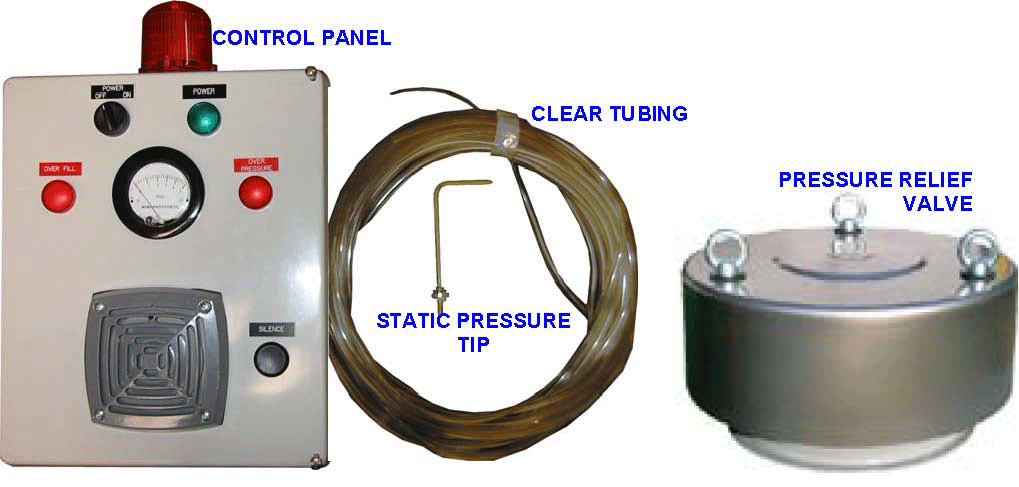
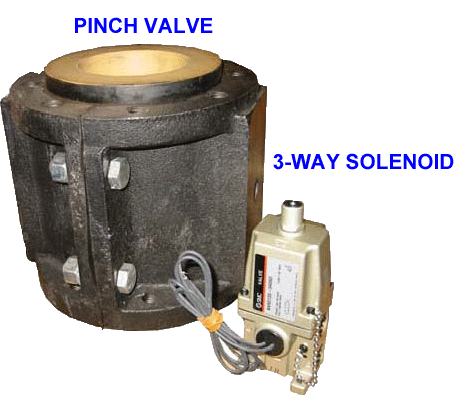
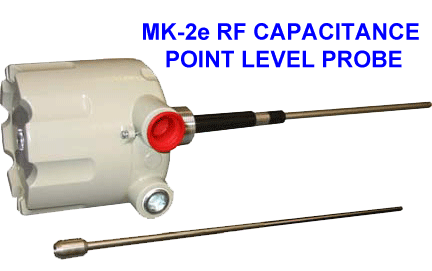
OVERVIEW (refer to Diagram A, page 1) |
The Silo Over-fill/Over-pressure Kit utilizes a Point Level Device and a Pressure Sensor to detect an Over-fill and/or an Over-pressure condition which then sets off an audio visual alarm as well as activates a pinch valve to shut down the fill line. In an overfill condition, the point level device will detect material and send a signal to the control panel. The red over-fill indicator light on the front of the panel will illuminate, the audio alarm (96dB electronic horn) will sound and an adjustable delay timer will be activated. When the delay time expires, the system will activate the visual alarm (orange strobe light). At this time a signal will also be sent to the solenoid valve to activate the pinch valve to shut off flow through the silo fill line. If the point level device no longer senses material presence, the pinch valve will open and the horn and orange strobe light will turn off. In an over-pressure condition, the photohelic pressure gauge will sense the silo pressure and when a preset level is reach (preset 1) the red over-pressure indicator on the front of the panel will illuminate and the horn will sound. Should silo pressure continue to rise and reach a second preset level (preset 2) the orange strobe light will be activated and a signal will be sent to the solenoid valve to close the pinch valve to shut off flow through the silo fill line. If the pressure detected drops below set point 2, the pinch valve will open and the orange strobe light will turn off. As long as the pressure remains above set point 1, the over pressure indicator will go out and the horn will cease. The silence button next to the horn on the front of the panel will allow an operator to silence the horn while it is activated. The silence button has no effect on the status of the orange strobe light or the pinch valve. A failsafe feature has been incorporated into the panel which will close the pinch valve if power to the panel is lost of turned off. This will prevent filling the silo in the event of a power outage and will also prevent unauthorized operators from disabling the system and continuing to fill the silo. |
INSTALLATION
|
||||||||||||||||
1) Install Pinch Valve in Silo Fill Line a. Install Pinch Valve in Silo Fill Line (refer to I & O Document included with pinch valve). b. Connect compressed air supply (40 to 50 PSI above process line pressure) to solenoid valve "E" connection. Note: the "P" connection on solenoid valve be left open to exhaust air from the pinch valve.
2) Install Pressure Relief Valve on Silo Roof (refer to I & O manual included with valve.) Note: the pressure relief valve has been preset of the maximum 1.4 PSI setting. CHECK WITH THE MANUFACTURERS OF YOUR SILO AND OTHER DEVICES TO DETERMINE THE CORRECT SAFE SETTING FOR THIS VALVE! 1.1
3) Install Monitor MK-2e RF Capacitance Level Control (refer to I & O Manual included with level control ). Power and relay connections are provided at Control Panel (see step #8 below).
4) Mount Panel a. Select a location that is in clear sight of any operator performing silo fill operations. b. Securely mount panel utilizing the four mounting holes provided on the enclosure flange.
5) Mount Static Pressure Tip in Bin Vent a. Select a location as high in Bin Vent as possible and between dust collector filters on dirty side (see Diagram C). b. Drill a 7/16" hole in selected location. c. Install Static Pressure Tip with barb facing outward. |
||||||||||||||||
DIAGRAM C |
||||||||||||||||
INSTALLATION (continued)
6) Connect 3/16" Clear Tubing a. Install one end of the tubing over barb on Static Pressure Tip. b. Install other end of tubing over barb at bottom of Control Panel (see Diagram D). c. Secure tubing as necessary being careful to avoid pinching kinking the line d. SEE MAINTENANCE SECTION
7) Connect power supply to panel (see Diagram E) a. Turn power Off/On Selector Switch to Off Position b. Drill hole in panel as necessary for conduit connection. c. Run 115 VAC power to panel and connect L1 to fuse holder "+" terminal, N to "N" terminal and ground to "G" terminal.
8) Connect Control Panel to Level Control (see Diagram E) a. Connect "L1" output on Control Panel to "+" on Level Control power input (refer to Level Control I & O Manual) b. Connect "N" output on Control Panel to "-" on Level Control power input (refer to Level Control I)
9) See Level Control I & O Manual for level control installation details and setup. a. Set Fail-Safe switch to "H" (see Diagram E). b. Minimize level control delay setting. The MK-2e level control has a 1-turn potentiometer to adjust delay time from 0.25 to 15 seconds from the time material is sensed to the time the relay changes state. This is to filter out false signals resulting from shifts in material. This delay setting should be minimized. Total delay will be the sum the level control delay plus the delay set by the adjustable timer (see Setup step 2, page 7).
|
||||||||||||||||
SET-UP: 1) Verify all components are properly installed. 2) Set the adjustable timer inside the panel (see Diagram F). This setting is dependent on the fill rate and the configuration of the particular silo. When the point level device first senses material, the over-fill indicator on the front of the panel will illuminate, the horn will sound and the timer delay is activated. When the delay time has elapsed. the orange stroble light will activate and the pinch valve will shut down the line. Adjust the timer delay to the appropriate setting. The timer is adjusted by turning the knob to the appropriate setting. The scale is also adjustable allowing for a wide range of settings. IT THIS SETTING IS NOT PROPERLY DETERMINED AND SET, THE SILO MAY OVER-FILL BEFORE THE VISUAL ALARM AND THE PINCH VALVE ARE ACTIVATED. A DANGEROUS CONDITION LEADING TO PROPERTY DAMAGE AND/OR PERSONAL INJURY OR DEATH MAY RESULT. Record your predetermined timer setting in the following table:
3) Set Pessure setpoints. a. Establish user pressure setpoints. CONSULT WITH THE MANUFACTURERS OF YOUR WILO AND OTHER DEVICES TO DETERMINE AMOUNT OF PRESSURE YOUR PARTICULAR SILO IS SAFELY ABLE TO WITHSTAND. IF THIS PROCEDURE IS NOT PERFORMED, A DANGEROUS CONDITION LEADING TO PROPERTY DAMAGE AND/OR PERSONAL INJURY OR DEATH MAY RESULT. The default setpoints are indicated in table 2. Record your predetermined user settings in the column provided.
4) Adjust pressure setpoints as necessary
a. Control Panel Setpoint 1. This setpoint is the Warning Setpoint and will activate the Over Pressure indicator on the front of the panel as well as the horn. This setting has been preset to 0.75 PSI. To adjust, perform the following: 1a) Temporarily connect a verified air pressure source to the barb connection at the bottom of the control panel (this is connected to the "=" port on the Photohelic Gauge.) MAXIMUM ALLOWABLE AIR PRESSURE CONNECTED TO THE PHOTOHELIC GAUGE IS 30 PSI. 2a) Turn the Power Off/On switch to the "ON" position. This will power up the Photohelic Gauge (24 VAC). CAUTION: THIS MUST BE PERFORMED BY QUALIFIED PERSONNEL. THE PANEL WILL BE ENERGIZED. HAZARD OF ELECTRICAL SHOCK IS PRESENT. 3a) When the desired pressure is indicated on the Photohelic Gauge, press and hold the red button labeled "SP1" on the back of the gauge (see Diagram G). The red LED on the back will blink. Continue to hold the button until the LED illuminates solid.
b. Control Panel Setpoint 2. This setpoint is the activation point for the orange strobe light and the Pinch Valve. This setting has been preset to 1.0 PSI. To adjust, perform the following: 1a) Temporarily connect a verified air pressure source to the barb connection at the bottom of the control panel (this is connected to the "+" port on the Photohelic Gauge.) MAXIMUM ALLOWABLE AIR PRESSURE CONNECTED TO THE PHOTOHELIC GAUGE IS 30 PSI. 2a) Turn the Power Off/On switch to the "ON" position. This will power up the Photohelic Gauge (24 VAC). CAUTION: THIS MUST BE PERFORMED BY QUALIFIED PERSONNEL. THE PANEL WILL BE ENERGIZED. HAZARD OF ELECTRICAL SHOCK IS PRESENT. 3a) When the desired pressure is indicated on the Photohelic Gauge, press and hold the red button labeled "SP2" on the back of the gauge (see Diagram G). The red LED on the back will blink. Continue to hold the button until the LED illuminates solid. 1.1
c. Pressure Relief Valve Setpoint. This setting has been preset to 1.4 PSI. (refer to the Pressure Relief Valve I & O Manual for adjustment procedure)
|
||||||||||||||||
OPERATION: 1) Place the Power Off/On Selector Switch in "On" position. Note: The Audio Visual Alarm and the indicator lights will momentarily activate. This is normal. 2) Begin the Silo Fill Operation. 3) If the Horn Sounds and the Red over-fill warning indicator light and/or the Red Over-pressure warning indicator light on the front of the Control Panel should illuminate, stop the fill operation. 4) If fill is continued and pressure setpoint 2 is reached or if the timer delay expires and material is still present, the orange strobe light will activate and the Pinch Valve will close. 5) The Horn can be silenced by pressing the "SILENCE" button next to the horn. The silence button will have no affect on the status of the orange strobe light or the pinch valve. |
||||||||||||||||
MAINTENANCE: The Static Pressure Tip is designed to minimize dust particles from entering the pressure sense line (clear tubing) which might cause plugging of the line or damage to the Photohelic pressure gauge. However, it is impossible to full eliminate dust from entering this line. The line requires periodic cleaning. Perform the following procedure as required. 1) Remove the 3/16" Clear Tubing from the barb fitting at the bottom of the control panel (see Diagram D, page 6) 2) Blow compressed air into tubing. Verify only clear air is blowing out of Static Pressure Tip. DO NOT BLOW AIR INTO BARBED FITTING AT CONTROL PANEL OR DAMAGE TO THE PHOTOHELIC GAUGE MAY RESULT. MAXIMUM ALLOWABLE AIR PRESSURE CONNECTED TO THE PHOTOHELIC GAUGE IS 30 PSI. 3) Reconnect the clear tubing to the barb fitting at the bottom of the control panel. |

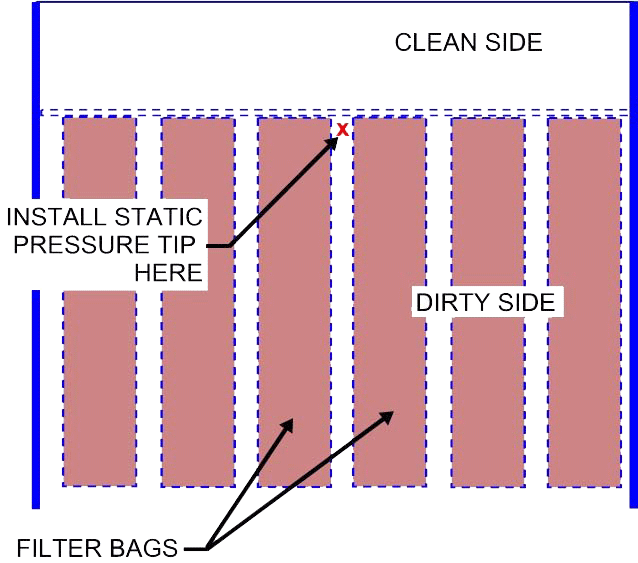
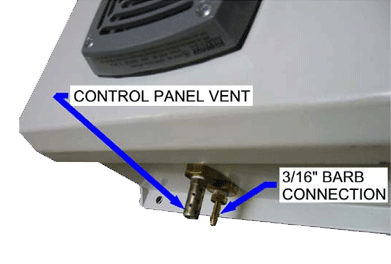 Diagram D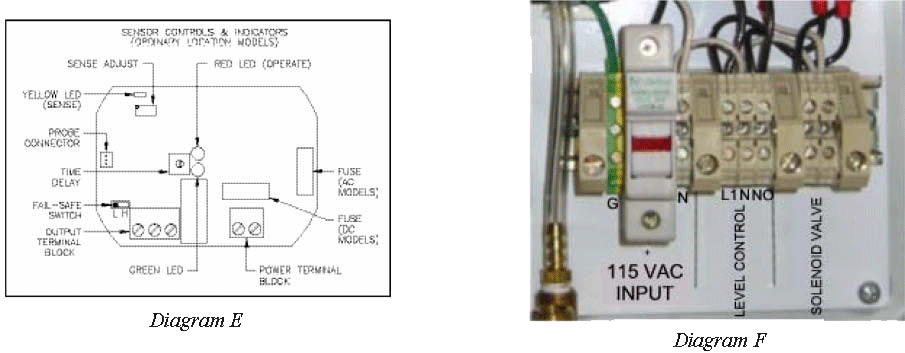
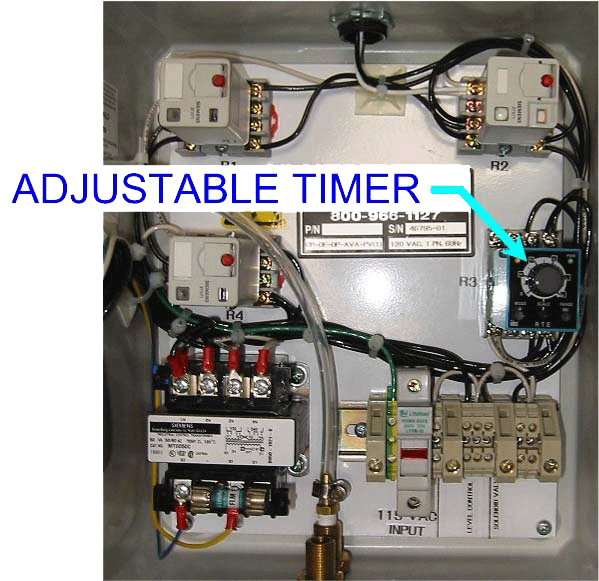 Diagram G
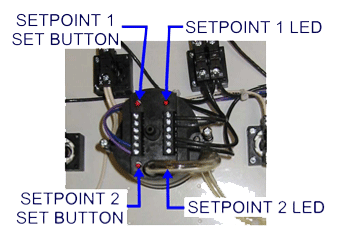 DIAGRAM H